AI Chatbot for magento 2
In stock
- SKU
- ai-chatbot
MageHQ AI Chatbot for Magento 2
MageHQ AI Chatbot brings an intelligent, context-aware AI assistant directly to your Magento 2 storefront. It helps customers find products, understand store policies, ask about shipping or returns, check order status, and get support without waiting for a human agent.
Unlike a generic chat widget, MageHQ AI Chatbot is built specifically for Magento. It can use real storefront context such as the current product, category, cart items, customer group, recently viewed products, and store information to deliver more relevant answers during the shopping journey.
AI Shopping Assistant for Your Storefront
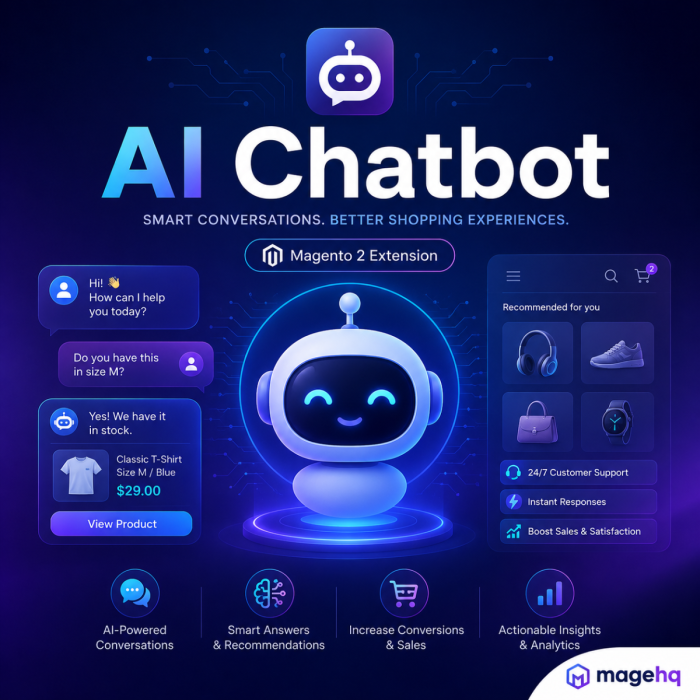
The chatbot appears as a modern floating widget on your website and opens into a clean conversational panel. Customers can ask natural questions about products, categories, orders, shipping, returns, and support topics. The assistant can respond with formatted answers, quick replies, and product suggestion cards that include product images, prices, and links.
Magento-Aware Responses
MageHQ AI Chatbot can enrich AI prompts with Magento store context, helping the assistant understand where the shopper is and what they may need. The module can pass product, category, cart, customer, and store data into the conversation flow based on admin configuration.
Product and Content Training Data
The module indexes product, category, and CMS page content into chatbot training data. This allows the assistant to reference your own catalog and store content when answering customer questions. A scheduled cron job keeps the training data refreshed automatically.
Order-Aware Customer Support
Customers can ask about an order by providing their order number and email address. The module verifies the order before returning basic order details such as order status, state, and total. This helps reduce repetitive order status support requests while protecting sensitive customer information.
Flexible AI Connectivity
MageHQ AI Chatbot supports connection approache.The module includes support for popular AI providers such as OpenAI, DeepSeek, Anthropic, Gemini, and OpenAI-compatible providers.
Customizable Chat Experience
Store admins can customize the chatbot name, welcome message, fallback message, system prompt, assistant personality, colors, gradients, chat bubble styles, panel radius, shadow, and custom CSS. The frontend widget also includes dark mode support and remembers the shopper’s conversation state.
Admin Dashboard, Logs, and Diagnostics
The admin panel includes a dedicated AI Chatbot dashboard with total chats, token usage, unresolved conversations, and recent activity. Diagnostics help verify license, subscription, plan code, routing, and connection status. Message logs allow admins to review requests, responses, success status, error codes, provider/model data, and token usage, with CSV export support.
Privacy and Control
MageHQ AI Chatbot includes privacy and access controls for production use. Admins can mask customer email, phone, and name, choose whether to include PII in AI requests, disable full message storage, restrict usage by customer group, block IP addresses, configure message rate limits, and set message log retention.
Key Features
- AI chatbot widget for Magento 2 storefronts
- Context-aware answers using Magento product, category, cart, customer, and store data
- Product suggestion cards with image, price, SKU, and product URL
- Order status lookup with email verification
- Quick replies and conversation history
- Customizable chatbot name, welcome message, fallback message, prompt, and personality
- Modern frontend UI with dark mode and configurable design tokens
- Product, category, and CMS page training data indexing
- Own API key mode for supported AI providers
- Admin dashboard with chat, token, and unresolved conversation metrics
- Diagnostics page for connection and subscription status
- Message log grid with filters, CSV export, summary export, and cleanup tools
- Privacy controls for PII masking and message storage
- Customer group restrictions, IP blocking, and rate limiting
- Automatic cron-based training data reindexing and log cleanup
Why Use MageHQ AI Chatbot?
MageHQ AI Chatbot helps Magento merchants improve customer experience, reduce repetitive support questions, and guide shoppers toward relevant products. It combines AI conversation, Magento storefront context, product suggestions, admin visibility, and privacy controls in one Magento-native module.
Magehq AI Chatbot — Questions & Answers
1. What is Magehq AI Chatbot?
Magehq AI Chatbot is a Magento 2 extension that adds an AI-powered assistant to your storefront. It helps customers ask questions about products, orders, shipping, store policies, and support topics directly from a modern chat widget.
2. How does the chatbot help Magento store owners?
The chatbot helps reduce repetitive support requests, improves customer engagement, and gives shoppers faster answers while they browse your store. It can guide customers, answer product-related questions, and support common pre-sales conversations.
3. Can the chatbot answer product questions?
Yes. The module can send product context to the AI assistant, allowing it to generate more relevant answers about product details, availability, features, and shopping-related questions.
4. Can it understand category and cart context?
Yes. The chatbot supports product, category, and cart context. This helps the assistant provide more useful responses based on where the customer is browsing and what is currently in the shopping cart.
5. Can it answer order-related questions?
Yes, the module includes an order context option. Store admins can enable or disable order context depending on their privacy and support requirements.
6. Does the chatbot support customer context?
Yes. Customer context can be enabled from the admin configuration. This allows the assistant to provide more personalized responses when appropriate.
7. Is customer privacy protected?
Yes. Magehq AI Chatbot includes privacy settings such as masking customer email, phone number, and customer name. Admins can also choose whether personally identifiable information should be included in AI requests.
8. Can I use my own OpenAI API key?
Yes. The module supports an “Own API Key” connection mode. Admins can configure the API provider, base URL, API key, model, timeout, temperature, and max tokens from the Magento backend.
9. Does the module support different AI models?
Yes. The module includes model configuration options. Available model choices can be updated based on the selected AI provider.
10. Can I customize the chatbot appearance?
Yes. The chatbot widget can be customized with colors, backgrounds, borders, radius, shadows, gradients, bubble colors, and custom CSS. This allows the chatbot to match your store branding.
11. Does it support dark and light mode?
Yes. The storefront widget supports modern visual styles, including dark and light appearance options, so the chatbot can fit different storefront designs.
12. Where does the chatbot appear on the storefront?
The chatbot appears as a floating assistant widget on the storefront. Customers can open it from the chat icon and start a conversation without leaving the current page.
13. Can I change the chatbot name and welcome message?
Yes. Admins can configure the chatbot name, welcome message, fallback message, system prompt, and assistant personality from the Magento admin panel.
14. Can I control who can use the chatbot?
Yes. The module includes allowed customer group settings. Admins can decide which customer groups are allowed to access the chatbot.
15. Does it include rate limiting?
Yes. Magehq AI Chatbot includes controls such as maximum messages per minute and cooldown seconds. This helps protect the store from abuse and unnecessary AI usage.
16. Can I block specific IP addresses?
Yes. Admins can add blocked IP addresses from the configuration panel to prevent unwanted usage.
17. Does the module provide analytics?
Yes. The module includes chatbot analytics, including total chats, token usage, unresolved conversations, and message-related activity.
18. Are message logs available in the admin panel?
Yes. The module includes AI Chatbot Message Logs where admins can review chatbot requests, responses, status, provider, model, connection mode, and error information.
19. Can I export chatbot logs?
Yes. The message logs grid supports Magento admin grid actions, including export options. The module also includes summary CSV download functionality.
20. Does it help track failed AI requests?
Yes. The logs include status and error information, helping admins troubleshoot failed requests, quota issues, provider errors, or configuration problems.
21. Can I configure a fallback response?
Yes. Admins can define a fallback message that will be shown when the chatbot cannot answer confidently or when a response cannot be generated.
22. Can I control the AI behavior?
Yes. The module includes system prompt and assistant personality settings. Store admins can guide the chatbot to answer in a specific tone, style, and scope.
23. Does the chatbot support support-related questions?
Yes. The assistant can be configured to answer common support questions such as shipping, order help, product guidance, and store policy questions.
24. Will the chatbot replace human support?
Magehq AI Chatbot is designed to assist customers and reduce repetitive questions, but it should complement human support rather than fully replace it. Complex or sensitive issues can still be handled by store staff.
25. Is the chatbot suitable for Magento stores with many products?
Yes. The module is suitable for Magento stores that want to improve customer support, product discovery, and pre-sales assistance at scale.
26. Can I use custom CSS?
Yes. The module includes a Custom CSS field, allowing developers or store owners to apply additional frontend styling.
27. Does the module support logging and debugging?
Yes. Admins can enable logging, debug logs, and full message storage depending on their troubleshooting and compliance needs.
28. Can I set log retention?
Yes. The module includes message log retention settings, allowing admins to define how long chatbot logs should be kept.
29. Is the chatbot mobile-friendly?
Yes. The floating chatbot widget is designed for storefront usage and can be styled to work across desktop and mobile layouts.
30. Why should I use Magehq AI Chatbot?
Magehq AI Chatbot helps Magento stores deliver faster customer support, smarter product assistance, better shopping experiences, and useful admin insights through an AI-powered storefront assistant.
Why Choose MageHQ?
MageHQ develops reliable Magento 2 extensions focused on performance, compatibility, and simplified store management workflows.
Magento-Focused Development
We specialize in Magento 2 extensions built specifically for real-world eCommerce workflows and Magento store operations.
Clean & Optimized Code
Extensions are developed following Magento coding standards to ensure stability, performance, and maintainability.
Fast Technical Support
Our support team is available to help with installation, configuration, compatibility, and extension-related questions.
Easy Installation & Configuration
Simple installation and user-friendly configuration help merchants and developers get started quickly.